The revenue-first AI agency.
TheCMO is the revenue-first AI agency. We build an AI revenue system for your business. It brings in leads, follows up, and runs your ads. Nothing goes live until you say yes.
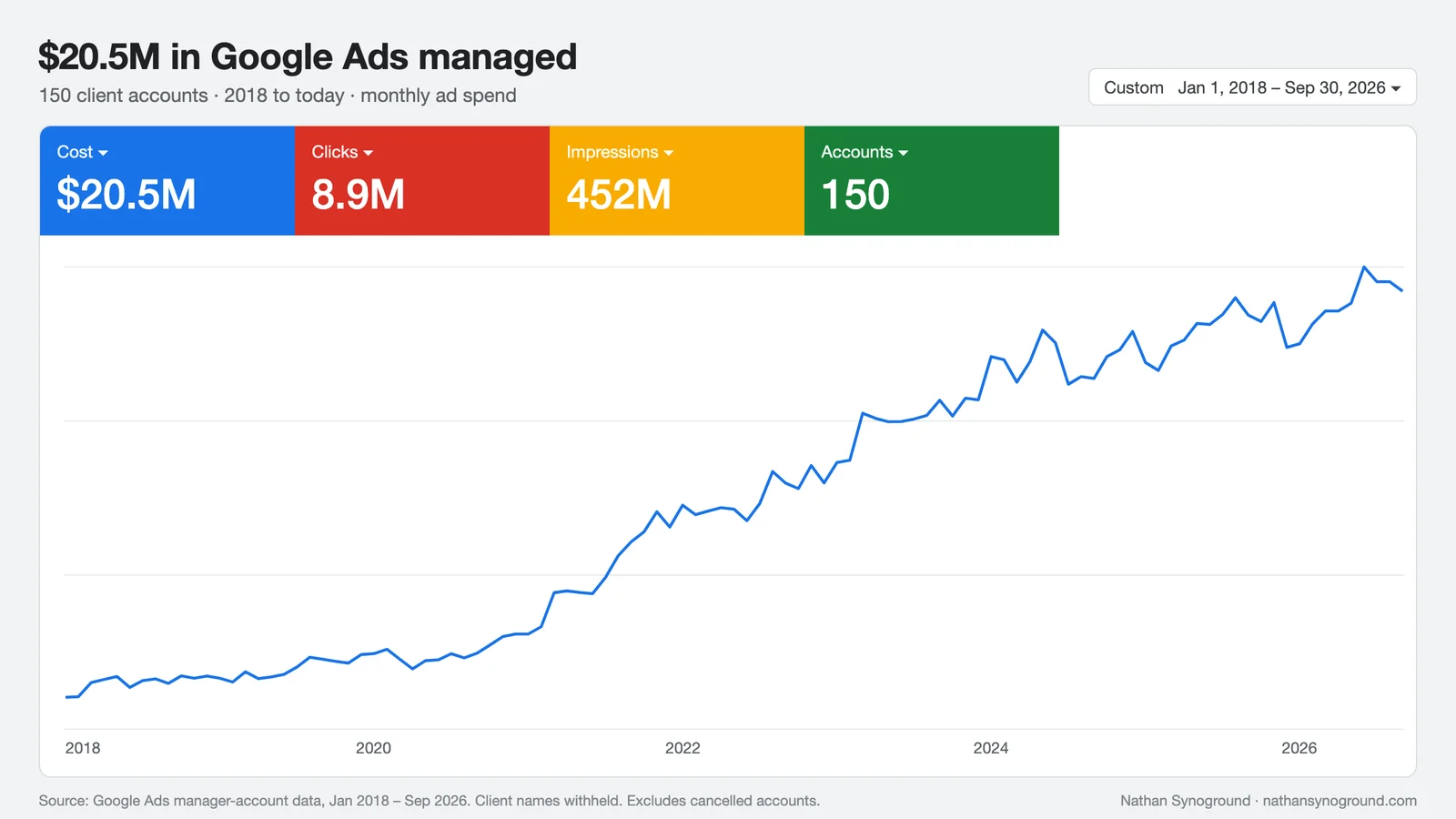
Nathan Synoground, owner of TheCMO.AI & FruitfulLocal.com, has managed $20.5M in Google Ads across 150 client accounts since 2018.
- I want more customersWe build it and run it with you.
- I want to try it myselfFree inside Claude. See the 4 steps.
- I want to learn howFree group, all courses and prompts.
What should I fix in my marketing this week?
TheCMO read your Google Ads, Search Console and website
Three things, most important first:
- Two of your ads send people to your home page. Point them at the page for that service.
- You're paying for searches for jobs you don't do. I've listed six to block.
- Your best-reviewed service has no page of its own. I've drafted one for you to read.
Example conversation. An illustration, not a real account.
What is in your AI revenue system.
Every part is judged on one thing: did it make you money?
Google Ads and Meta ads, written and tested by AI. It cuts the searches and audiences that never buy.
Landing pages built for one job: turn the click into a call, a form or a sale.
Calls and forms land in one place, tagged with the ad that sent them.
New leads get an answer while they still want to buy.
Show up when people ask ChatGPT or Google who to hire.
It plans the marketing and writes the work. Nothing goes live until you say yes.
Built by someone who has run the ads.
Nathan Synoground, owner of TheCMO.AI & FruitfulLocal.com, has managed $20.5M in Google Ads across 150 client accounts since 2018.
- Google Ads managed
- $20.5M
- client accounts
- 150
- tracked revenue, 12 ecommerce brands
- $24.0M
Google Ads manager-account data, January 2018 to September 2026. Readable accounts only, cancelled accounts excluded, client names withheld. Tracked revenue is conversion value recorded by Google Ads conversion tracking. The ecommerce brands spent $4.0M to get that $24.0M.
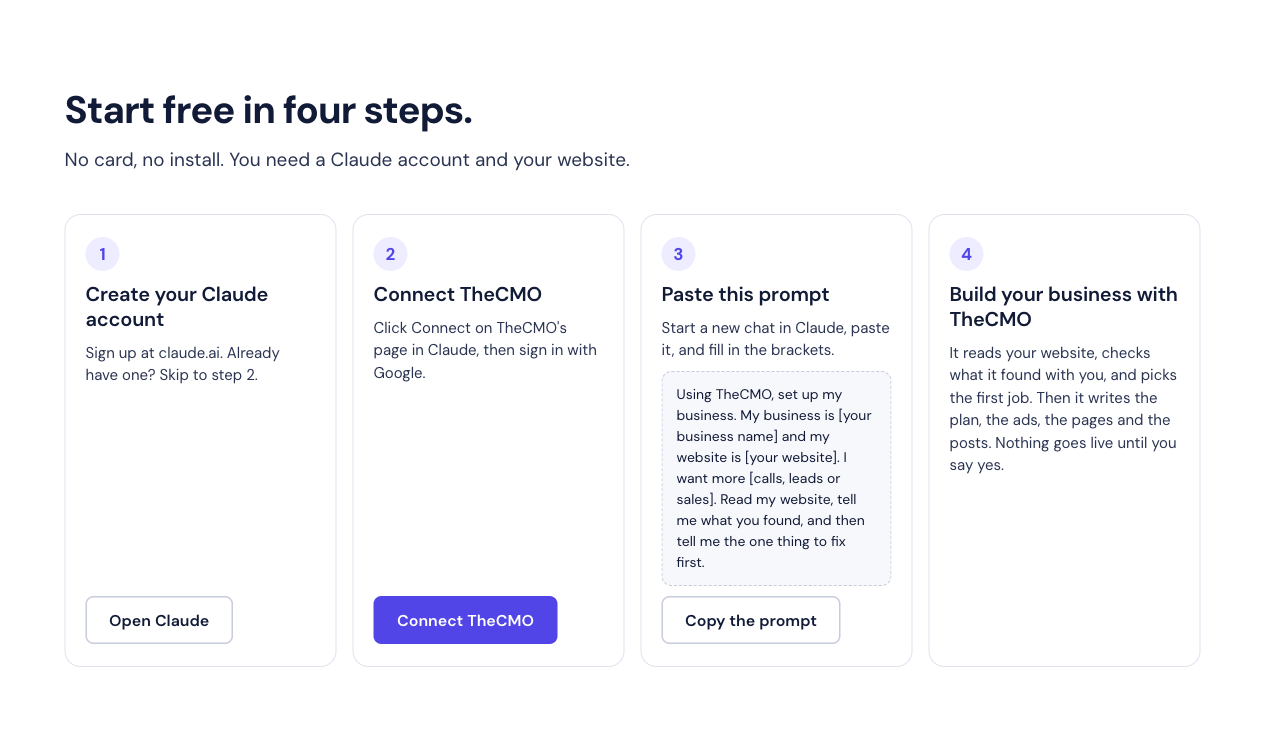
Start free in four steps.
No card, no install. You need a Claude account and your website.
- 1
Create your Claude account
Sign up at claude.ai. Already have one? Skip to step 2.
Open Claude - 2
Connect TheCMO
Click Connect on TheCMO's page in Claude, then sign in with Google.
Connect TheCMO - 3
Paste this prompt
Start a new chat in Claude, paste it, and fill in the brackets.
Using TheCMO, set up my business. My business is [your business name] and my website is [your website]. I want more [calls, leads or sales]. Read my website, tell me what you found, and then tell me the one thing to fix first.
- 4
Build your business with TheCMO
Check what it found and correct anything wrong. Then send this prompt to finish your first job.
Using TheCMO, do that first job now and save the finished work as a draft for my business. Show me what you made, what you checked, and how to find it again.
Your first win is one finished draft you can find again. Review it before approving a live change.
Want Nathan to connect your accounts and set this up for your business? Have Nathan set this up for you.
See a real change on our own site.
We used TheCMO to review how people start and get help. Here is one change we made on October 4, 2026.
Before: advice, then what?
The first prompt asked for the one thing to fix. The next step said to build your business, but gave you no prompt to finish the job.
After: finish one useful job.
There is now a second prompt to make and save a draft, explain what was checked, and tell you how to find it again. You can keep going free or have Nathan set it up.
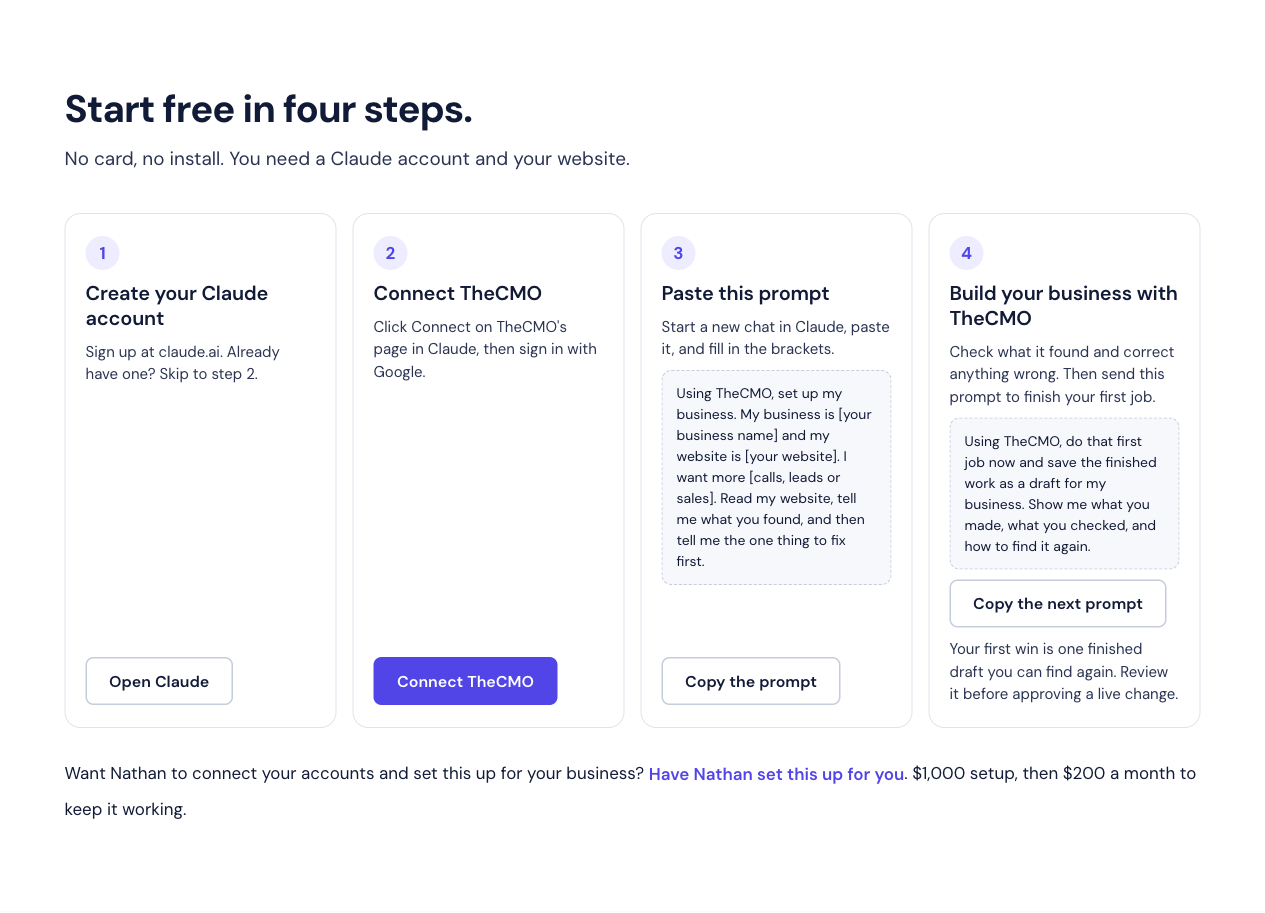
The change is live and checked on desktop and phone. We haven't measured a change in bookings yet.
Then just ask it. Like this.
Type what you want in plain words. Start with “Using TheCMO” so Claude knows to use it. It reads your website and accounts first, then does the work.
It shows you everything before it changes anything.
- “Why are my Google Ads not getting calls?”
- “Write three Facebook ads for my spring special.”
- “Make my home page get more calls.”
- “Write replies to my newest Google reviews.”
- “What should I fix in my marketing this week?”
- “How do I show up when people ask ChatGPT who to hire?”
We run our own agency on it.
Fruitful Local, Nathan's marketing agency, runs every client's marketing on TheCMO. These are the businesses behind the numbers.
- in revenue our clients tracked
- $4.3M+
- new leads since March
- 1,800+
- businesses run on it
- 20











Revenue as reported by our clients. Leads are calls and form enquiries, March to October 2026.